4 How to use this book
4.1 General information
The Hitchhiker’s Guide (HHG) is an online book created using an open-source authoring and publishing system called Quarto. We hope that by publishing the HHG in HTML format, it will be more easily accessible—e.g. to vision-impaired or dyslexic students.
If you have dyslexia, you might be interested in this list of Chrome extensions for people with dyslexia. If you have any suggestions on how to improve the accessibility further, please .
4.2 Searching the HHG
This book uses Algolia, an advanced search engine, to help you find content quickly. To open the search, click the Search icon:
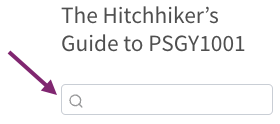
Here are a few tips to help you search effectively:
- Standard Search: Just type your keywords. The search assumes “AND” between words, so typing summative lab report will only show results that contain all of these words.
- Exact Phrase: To find an exact sentence or concept, put it in quotes. Example: “summative assessments” will only find that specific phrase.
- Exclude Words: Use a minus sign (-) to filter out topics you don’t want. Example: “help desk” -“weekly overview” will show results that match “help desk”, but do not include the words “weekly overview” (i.e., the “Weekly overview” chapter will be excluded from the search results).
Navigation Tip: When you click on a search result, you will be taken to that section. If it’s not what you were looking for, click your browser’s Back button. This will take you right back to your search results so you can pick a different link without typing your query again.
4.3 Progress tracking
Some of the HHG chapters require self-study. These parts are marked with a 🏠 icon. Once you have completed these parts, confirm their completion in the Moodle section HHG Self-Study Completion Tracking.
4.4 Online vs. PDF version
This book is designed to be an interactive learning experience and is best viewed in its online HTML format. The online version includes features that are not available in a static format, such as:
- Interactive quizzes and exercises
- Embedded applications
- A full-text search function
For convenience, we also provide a PDF file for each lab class, which is ideal for offline reading and printing. You can find download links within the weekly overview chapter. Please be aware that the features mentioned above, emojis, collapsible sections and cross-references to other parts of the book are not working in the PDF. We recommend using the online version as your primary resource.
4.5 Current and older HHG versions
Note that the most current version of the HHG will always be available at this link: https://psychology.nottingham.ac.uk/staff/lpzjd/psgy1001
If you would like to access the version of HHG that was current when you were in Year 1 in future academic years, modify the link by adding the year in which you started like this: https://psychology.nottingham.ac.uk/staff/lpzjd/psgy1001-25