28 Routines
🏠 Self-study
In our multi-course meal analogy, routines correspond to individual dishes. What a dish tastes like depends on the ingredients. Analogously, what a routine does depends entirely on its components (see Chapter 29). In a way, a routine is just a container used to combine components.
Just as some dishes will have very few ingredients, some routines might consist of just one or two components. Others will have many more components, for example in cases where you want to present multiple independent stimuli.
28.1 Adding and removing routines
You can add a new routine to an experiment by clicking on “Insert Routine” and “(new)” in the flow. Newly created routines will be empty and are waiting for you to add components to them.
Note that “Insert Routine” can also be used to add already existing routines to the flow:
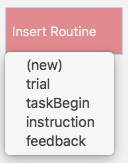
After clicking on “Insert Routine”, you can add a routine to a specific position in the flow by clicking on the circle that appears when you move the mouse pointer over the flow:

You can click on “CANCEL Insert” if you’re not yet sure where in the flow you would like to place it.
To remove a routine from the flow, right-click on the routine and select remove:
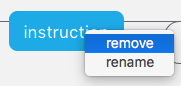
Note that this only removes the routine from the specific location in the flow, but not from the experiment or from another location in the flow.
To remove a routine from an experiment completely, click on the next to the routine’s name. This will automatically remove the routine from the flow as well.
28.2 Copying and pasting routines
Note that you can also copy and paste existing routines (including from one experiment to another):
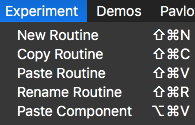
This can be a great time-saver!
28.3 Routines in our flanker task
Our flanker experiment has four routines: feedback, instruction, taskBegin and trial. Note that each routine has a separate tab. The routine trial is currently selected as indicated by the lighter shading and the :

In this flanker task, flankers and target appear at the same time. Therefore, only one Text component is required. This Text component might then present the stimulus HHSHH. What researchers sometimes do is give the flankers a head start. In this case, the flankers appear earlier than the target. Now, your routine needs two Text components. One to present the flankers, e.g. HH HH, and the other to present the target, e.g. S.
28.4 Naming routines
When you create a routine, you need to give it a name. There are some rules you must follow when naming routines:
- Use only letters, numbers, and underscores to name them (e.g., you must not use spaces!).
- Always begin the name with a letter (numbers and underscores can only come later).
- You cannot reuse names (once you have labelled a routine or component
stim, you cannot give another routine or component the same name).
PsychoPy will usually warn you if you try to use a name that is not possible.
Note that it is good practice to give routines names that indicate what they do. For example, our routine presenting the instructions is called instruction. If it was called trial_2, it would be rather unclear what its role is.
28.5 Confirmation
Please confirm you have worked through this chapter by submitting the corresponding chapter completion form on Moodle.