37 Changing component properties
🏢 Lab class
37.1 The basic idea
How do you tell PsychoPy that you want to change a component property (e.g., a piece of text, an image or a stimulus location) from one trial to the next? You tell PsychoPy that the property is variable.
How do you tell PsychoPy that the component property is variable? You provide PsychoPy with a variable name and set the component property to “set every repeat”.
Frequently, the variable name will come from the header row in your conditions file.1 It is probably most instructive to have a look at a more detailed example of this idea. We will use the Text property of the Text component for explaining the basic idea in more detail. Other properties will then be dealt with more briefly.
37.2 Changing text
If your aim is to change a piece of text from one trial to the next, you must update the Text property of the Text component. For this to work, you need:
- A variable name in the Text property field that is preceded by a
$sign.2 - An conditions file that has a column header that matches this variable name exactly.
- To select “set every repeat”.
These requirements are illustrated here:
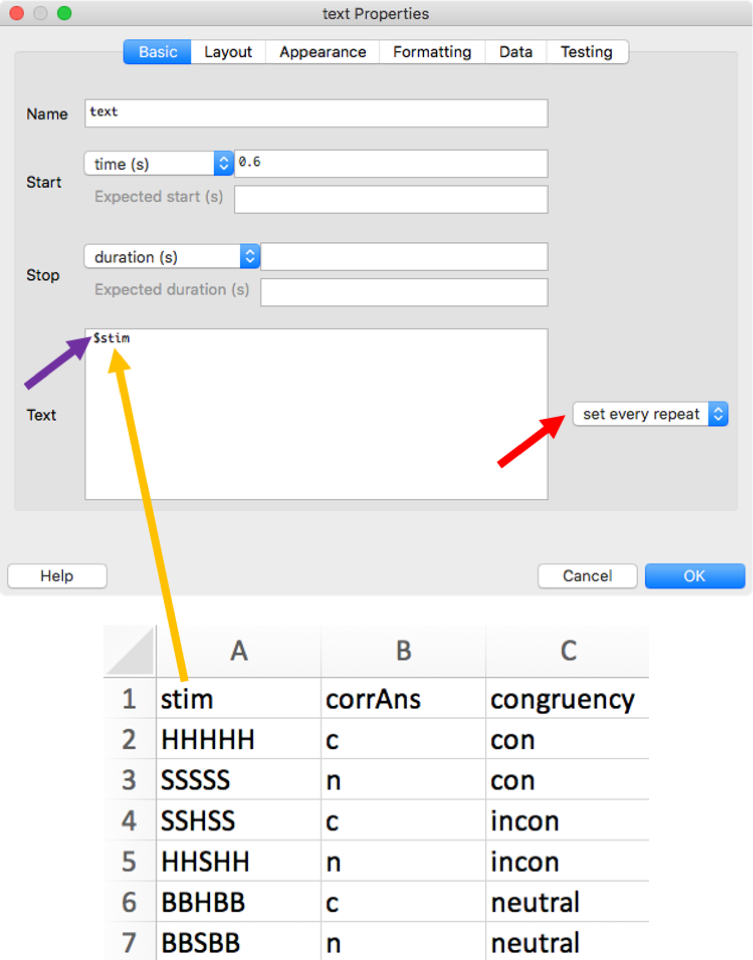
As this is such a common mistake, let us reiterate that the variable name in the Text field and the header in the conditions file need to match exactly. For example, the experiment will not run if you have stim in the Text field and Stim in the conditions file!
A frequent error that can be hard to spot is a space after the column header in Excel, e.g., stim_ (where _ represents a space). The most straightforward way to identify this issue is to open the conditions file in Excel and to right-align the contents of the columns.
Note that sometimes you might need more than one column in the conditions file to update stimulus properties. For example, to update the Stroop stimulus RED, you need to get information about the word as well as the colour from the conditions file. Thus, your conditions file needs separate columns for defining word and colour (see my Stroop experiment in Chapter 32). The same is true when you would like to change, say, the stimulus and its location from trial to trial.
🏠 Self-study
37.3 Changing images
If your experiment uses images that change from trial to trial, you will need to use an Image component and tell PsychoPy that the image should be updated on every repeat. The basic idea is the same as before: You provide PsychoPy with a variable name preceded by a $ sign and select “set every repeat”:

Again, the variable name needs to match a column header in the conditions file:
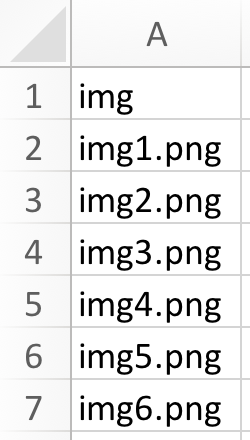
Note that the file name needs to include the extension of the file (.png in this example). Also, when defined without a path, the images must be located in the same folder as the .psyexp file.
37.4 Changing locations
If your experiment requires the location of stimuli to change from trial to trial, you will need to use the Position property of your component. The basic idea is the same as before: You provide PsychoPy with a variable name and select “set every repeat”. For example, if you would like to change the stimulus position along the y-axis, you could achieve this in the following way:

Again, the variable name needs to match a column header in the conditions file:
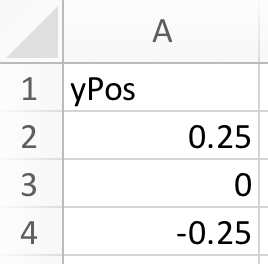
You might have noticed a difference to before though: We did not include the $ sign. Why is this? Note that next to “Position [x,y]” there already is a $ sign. This indicates that you should not add a $ sign here.3
What is the logic behind this? You do not need to add the $ sign when it does not make sense to enter text into a given field. For example, the position along one of the axes can only be a number. If you enter text, it is clear that this is meant to be a variable name. On the other hand, other properties can be represented by text (e.g., colours or file names). In these cases, you need to add the $ sign to indicate that you would like PsychoPy to interpret the input as a variable name.
37.5 Changing other properties
All other properties that can be changed from trial to trial (e.g., size, colour or orientation) work analogously to the examples illustrated above.
37.6 Confirmation
Please confirm you have worked through this chapter by submitting the corresponding chapter completion form on Moodle.
When you learn how to give feedback, you will see that you can also use Python code to create variable names.↩︎
Why is there a
$sign before the variable name? This tells PsychoPy that you don’t mean to literally presentstimon the screen, but thatstimshould be interpreted as a variable name.↩︎In fact, doing so would stop the experiment from running.↩︎